Example on the TreeAI Database#
In this notebook we illustrate the basic usage of deepforest-modal-app with the TreeAI Global Initiative dataset:
Pre-trained tree crown inference: predict tree crowns using the DeepForest pre-trained model
Fine-tune the tree crown model on the TreeAI annotations
Fine-tuned inference and evaluation: run inference with the fine-tuned model and compare results
For advanced topics (custom configuration, loggers, callbacks) see `treeai-advanced.ipynb <treeai-advanced.ipynb>`__. For multi-species classification with the crop model see `treeai-crop-model.ipynb <treeai-crop-model.ipynb>`__.
0. Setup#
Let us start with some imports:
[ ]:
import time
from os import path

import matplotlib.pyplot as plt
import pandas as pd

import deepforest_modal_app as dma
import treeai_utils
from deepforest_modal_app import eval_utils, plot_utils
Additionally, we will define some analysis parameters. We will be using the “12_RGB_ObjDet_640_fL” dataset of the Tree AI Database [2]. In order to run the notebook, you will need to set base_dir as the path to the “12_RGB_ObjDet_640_fL” directory of the Tree AI dataset. You can follow the instructions in the Zenodo repository to obtain the data.
We will focus on three target species: the Norway spruce (Picea abies), Scots pine (Pinus sylvestris) and European beech (Fagus sylvatica).
[ ]:
# path to the Tree AI dataset
base_dir = "treeai-data/12_RGB_ObjDet_640_fL"

# to name folders in the modal volumes
dataset_id = "12_RGB_ObjDet_640_fL"

# target species
target_species = ["picea abies", "pinus sylvestris", "fagus sylvatica"]

# viz args
figwidth = plt.rcParams["figure.figsize"][0]
figheight = plt.rcParams["figure.figsize"][1]

# for reproducibility
random_state = 0
Processing the TreeAI annotations into geo-data frames#
We’ll now run the code below to get our training and validation annotations as geo-data frames following the DeepForest format:
[ ]:
# load TreeAI dataset
train_gdf, train_img_dir, _ = treeai_utils.get_annot_gdf(
    base_dir, which="train", species=target_species
)
val_gdf, val_img_dir, _ = treeai_utils.get_annot_gdf(
    base_dir, which="val", species=target_species
)

# output fine-tuned model checkpoint
fine_tuned_filepath = path.join(dataset_id, "crown-fine-tune.pl")

# ensure that annotations are strictly larger than 1 px
# see also https://github.com/weecology/DeepForest/pull/1285
train_gdf = treeai_utils.ensure_gt_1px(train_gdf)
val_gdf = treeai_utils.ensure_gt_1px(val_gdf)

# since each image has a unique file name, we will use a single remote directory for all
# images (train and validation)
remote_img_dir = dataset_id

val_img_filenames = val_gdf["image_path"].unique()
# show the validation data frame
val_gdf.head()
100%|████████████████████████████████████████████████████| 1061/1061 [00:09<00:00, 112.83it/s]
100%|███████████████████████████████████████████████████████| 303/303 [00:04<00:00, 67.02it/s]
| label | image_path | xmin | ymin | xmax | ymax | geometry | |
|---|---|---|---|---|---|---|---|
| 80 | 1 | 000000000324.png | 436.00032 | 599.00032 | 527.00000 | 640.00000 | POLYGON ((527 599, 527 640, 436 640, 436 599, ... |
| 81 | 1 | 000000000324.png | 617.99968 | 620.00000 | 639.99968 | 640.00000 | POLYGON ((640 620, 640 640, 618 640, 618 620, ... |
| 82 | 1 | 000000000324.png | 608.00000 | 555.99968 | 640.00000 | 613.99968 | POLYGON ((640 556, 640 614, 608 614, 608 556, ... |
| 83 | 1 | 000000000324.png | 524.99968 | 559.00032 | 620.99968 | 640.00000 | POLYGON ((621 559, 621 640, 525 640, 525 559, ... |
| 84 | 17 | 000000000324.png | 584.00000 | 275.00000 | 640.00000 | 397.00000 | POLYGON ((640 275, 640 397, 584 397, 584 275, ... |
Uploading the required data (images) to a Modal storage volume#
Now we will start using Modal, more precisely, uploading (if they have not been uploaded already) the required images to a storage volume (by default named "deepforest-data"). Note that this already requires setting up your Modal user account (which you will only need to do once). Since installing deepforest-modal-app will also install the modal Python package, you will just need to run modal setup from the command line.
Once the Modal account is set up, we can run the cell below to upload the images using the ensure_imgs function, which takes a local directory as first argument and uploads all its images to the storage volume (in the directory specified by the remote_img_dir keyword argument):
[ ]:
# upload (if needed) train and validation images (to the same folder)
for img_dir in [train_img_dir, val_img_dir]:
    dma.ensure_imgs(
        img_dir,
        remote_img_dir=remote_img_dir,
    )
1. Inference with the pre-trained DeepForest tree crown model#
Once the required images are already in the storage volume, we can run an “ephemeral” DeepForest Modal app to perform inference with the fine-tuned model. To that end, we can use the `dma.app.run <https://modal.com/docs/guide/apps>`__ method as a context manager and then run the predict function, which takes the image file names, the path to the remote folder in the storage volume and forwards the rest of keyword arguments to the DeepForest ``predict_tile`
function <https://deepforest.readthedocs.io/en/v2.1.0/user_guide/16_prediction.html#predict-a-tile-using-model-predict-tile>`__, e.g., the intersection over union (IoU) threshold to consider that two bounding boxes are “match”:
[ ]:
# # run inference
# with modal.enable_output():
# run ephemeral app
with dma.app.run():
    _start = time.perf_counter()
    pt_pred_gdf = dma.predict.remote(
        img_filenames=val_img_filenames,
        remote_img_dir=remote_img_dir,
    )
    print(
        f"Pre-trained inference predicted {len(val_img_filenames)} tiles in "
        f"{time.perf_counter() - _start:.1f}s"
    )
Pre-trained inference predicted 145 tiles in 37.9s
After running inference (in the “ephemeral” GPU-enabled app), we will get the results locally as a geo-data frame:
[ ]:
pt_pred_gdf.head()
| xmin | ymin | xmax | ymax | label | score | image_path | geometry | |
|---|---|---|---|---|---|---|---|---|
| 0 | 306.0 | 164.0 | 422.0 | 282.0 | Tree | 0.273658 | 000000000324.png | POLYGON ((422 164, 422 282, 306 282, 306 164, ... |
| 1 | 1.0 | 491.0 | 46.0 | 593.0 | Tree | 0.269762 | 000000000324.png | POLYGON ((46 491, 46 593, 1 593, 1 491, 46 491)) |
| 2 | 90.0 | 151.0 | 215.0 | 271.0 | Tree | 0.266192 | 000000000324.png | POLYGON ((215 151, 215 271, 90 271, 90 151, 21... |
| 3 | 195.0 | 90.0 | 296.0 | 193.0 | Tree | 0.227980 | 000000000324.png | POLYGON ((296 90, 296 193, 195 193, 195 90, 29... |
| 4 | 310.0 | 489.0 | 412.0 | 586.0 | Tree | 0.226232 | 000000000324.png | POLYGON ((412 489, 412 586, 310 586, 310 489, ... |
Evaluate the pre-trained tree crown predictions, locally#
We can now evaluate the predictions of the pre-trained model locally - we are just comparing geo-data frames, there is absolutely no need for a GPU-enabled server:
[ ]:
# plot only a tiny sample of images
n_plot_imgs = 2
plot_img_filenames = pd.Series(val_img_filenames).sample(
    n_plot_imgs, random_state=random_state
)
fig = plot_utils.plot_annot_vs_pred(
    pt_pred_gdf[pt_pred_gdf["image_path"].isin(plot_img_filenames)],
    val_gdf[val_gdf["image_path"].isin(plot_img_filenames)],
    val_img_dir,
    # since we are only predicting tree crowns, do not use any color code and do not add
    # any legend
    plot_pred_kwargs={"legend": False, "column": None},
    plot_annot_kwargs={"legend": False, "column": None},
)
/home/martibosch/libraries/deepforest-modal-app/.pixi/envs/user-guide/lib/python3.12/site-packages/rasterio/__init__.py:367: NotGeoreferencedWarning: Dataset has no geotransform, gcps, or rpcs. The identity matrix will be returned.
  dataset = DatasetReader(path, driver=driver, sharing=sharing, thread_safe=thread_safe, **kwargs)
/home/martibosch/libraries/deepforest-modal-app/.pixi/envs/user-guide/lib/python3.12/site-packages/rasterio/__init__.py:367: NotGeoreferencedWarning: Dataset has no geotransform, gcps, or rpcs. The identity matrix will be returned.
  dataset = DatasetReader(path, driver=driver, sharing=sharing, thread_safe=thread_safe, **kwargs)
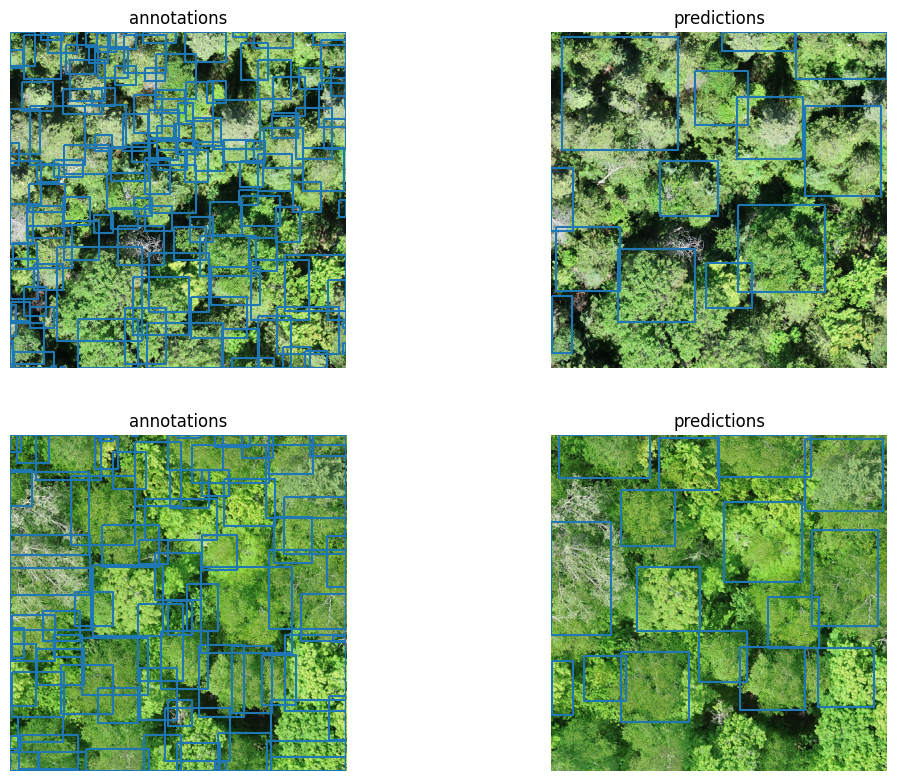
As we can see, there is much room for improvement. We can better quantify the visual impressions by computing (again, locally) the precision (proportion of predicted objects that have a ground truth positive match - for a given IoU threshold) and recall (proportion of ground truth objects that have a true positive match - for a given IoU threshold):
[ ]:
# # ignore species since the pre-trained model only predicts crowns
# crown_label_dict = {"Tree": 0}
crown_annot_gdf = val_gdf.assign(**{"label": "Tree"})

# evaluate results
eval_iou_threshold = 0.4  # deepforest defaults
pt_eval_results = eval_utils.evaluate_geometry(
    pt_pred_gdf,
    crown_annot_gdf,
    eval_iou_threshold,  # crown_label_dict
)
# eval_results["results"]
box_precision = float(pt_eval_results["box_precision"])
box_recall = float(pt_eval_results["box_recall"])
box_f1 = (
    0.0
    if (box_precision + box_recall) == 0
    else 2 * box_precision * box_recall / (box_precision + box_recall)
)
print(
    f"Evaluation metrics at IoU >= {eval_iou_threshold:.2f}\n"
    f"box_precision: {box_precision:.4f}\n"
    f"box_recall:    {box_recall:.4f}\n"
    f"box_f1:        {box_f1:.4f}"
)
Evaluation metrics at IoU >= 0.40
box_precision: 0.6284
box_recall:    0.1367
box_f1:        0.2245
2. Fine-tuning the tree crown detection model#
We can fine-tune the pre-trained model with the training annotations using retrain_crown_model.
The resulting checkpoint is saved to the persistent storage volume so it survives the ephemeral app and can be used in later runs. If the checkpoint already exists (from a previous run), pass retrain_if_exists=True to overwrite it.
For custom training configuration, loggers and callbacks see `treeai-advanced.ipynb <treeai-advanced.ipynb>`__.
[ ]:
with dma.app.run():
    _start = time.perf_counter()
    dma.retrain_crown_model.remote(
        train_gdf.assign(**{"label": "Tree"}),
        remote_img_dir,
        test_df=val_gdf.assign(**{"label": "Tree"}),
        dst_filepath=fine_tuned_filepath,
        retrain_if_exists=True,
    )
    print(
        "Fine-tuned crown model training completed in "
        f"{time.perf_counter() - _start:.1f}s"
    )
Fine-tuned crown model training completed in 1002.0s
We can now run inference with the fine-tuned model by using again the predict function but passing the path to the fine-tuned model checkpoint as the checkpoint_filepath keyword argument:
[ ]:
with dma.app.run():
    # predict with the fine-tuned model
    _start = time.perf_counter()
    ft_pred_gdf = dma.predict.remote(
        img_filenames=val_img_filenames,
        remote_img_dir=remote_img_dir,
        checkpoint_filepath=fine_tuned_filepath,
    )
    print(
        f"Fine-tuned inference predicted {len(val_img_filenames)} tiles in "
        f"{time.perf_counter() - _start:.1f}s"
    )
Fine-tuned inference predicted 145 tiles in 37.7s
Evaluate the fine-tuned tree crown predictions, locally#
Again, once we have performed fine-tuning and inference on a GPU-enabled ephemeral Modal app, we can evaluate the predictions locally:
[ ]:
fig = plot_utils.plot_annot_vs_pred(
    ft_pred_gdf[ft_pred_gdf["image_path"].isin(plot_img_filenames)],
    crown_annot_gdf[crown_annot_gdf["image_path"].isin(plot_img_filenames)],
    val_img_dir,
    # since we are only predicting tree crowns, do not use any color code and do not add
    # any legend
    plot_pred_kwargs={"legend": False, "column": None},
    plot_annot_kwargs={"legend": False, "column": None},
)
/home/martibosch/libraries/deepforest-modal-app/.pixi/envs/user-guide/lib/python3.12/site-packages/rasterio/__init__.py:367: NotGeoreferencedWarning: Dataset has no geotransform, gcps, or rpcs. The identity matrix will be returned.
  dataset = DatasetReader(path, driver=driver, sharing=sharing, thread_safe=thread_safe, **kwargs)
/home/martibosch/libraries/deepforest-modal-app/.pixi/envs/user-guide/lib/python3.12/site-packages/rasterio/__init__.py:367: NotGeoreferencedWarning: Dataset has no geotransform, gcps, or rpcs. The identity matrix will be returned.
  dataset = DatasetReader(path, driver=driver, sharing=sharing, thread_safe=thread_safe, **kwargs)
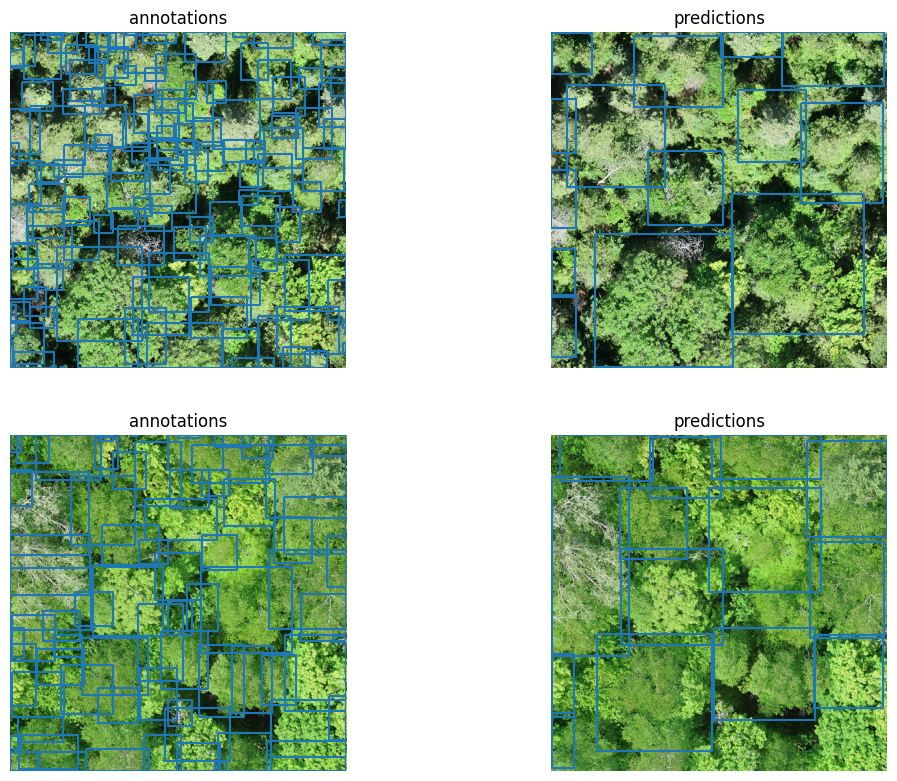
The fine-tuning does not seem to have improved the tree crown predictions, but let us again confirm this with the precision and recall metrics:
[ ]:
ft_eval_results = eval_utils.evaluate_geometry(
    ft_pred_gdf,
    crown_annot_gdf,
    eval_iou_threshold,  # crown_label_dict
)
# eval_results["results"]
box_precision = float(ft_eval_results["box_precision"])
box_recall = float(ft_eval_results["box_recall"])
box_f1 = (
    0.0
    if (box_precision + box_recall) == 0
    else 2 * box_precision * box_recall / (box_precision + box_recall)
)
print(
    f"Evaluation metrics at IoU >= {eval_iou_threshold:.2f}\n"
    f"box_precision: {box_precision:.4f}\n"
    f"box_recall:    {box_recall:.4f}\n"
    f"box_f1:        {box_f1:.4f}"
)
Evaluation metrics at IoU >= 0.40
box_precision: 0.5073
box_recall:    0.1076
box_f1:        0.1776
Not only fine-tuning on the training set did not improve the evaluation metrics for the validation set, but it actually made them worse (both the precision and recall).
References#
Weinstein, B. G., Marconi, S., Aubry‐Kientz, M., Vincent, G., Senyondo, H., & White, E. P. (2020). DeepForest: A Python package for RGB deep learning tree crown delineation. Methods in Ecology and Evolution, 11(12), 1743-1751.
Beloiu Schwenke, M., Xia, Z., Novoselova, I., Gessler, A., Kattenborn, T., Mosig, C., Puliti, S., Waser, L., Rehush, N., Cheng, Y., Xinliang, L., Griess, V. C., & Mokroš, M. (2025). TreeAI Global Initiative - Advancing tree species identification from aerial images with deep learning (TreeAI.V1.2) [Data set]. Zenodo. https://doi.org/10.5281/zenodo.15351054